
Devtools
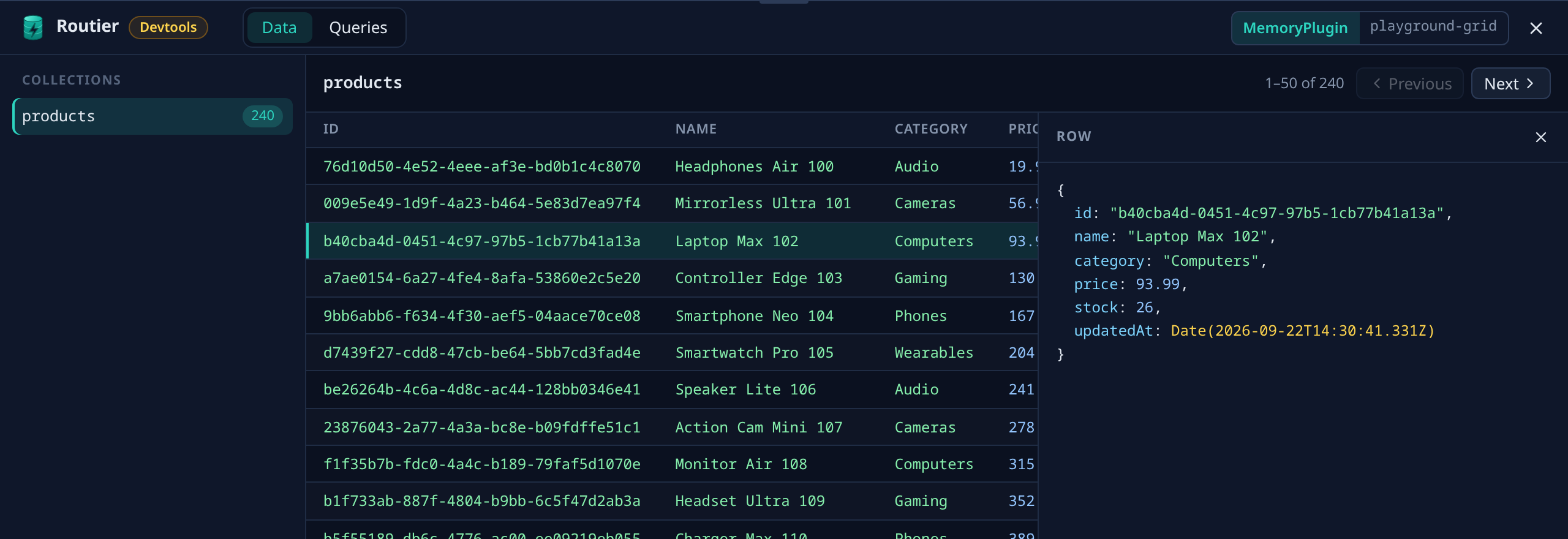
@routier/devtools adds a drawer to your page that shows what your store holds. It lists every collection and view with a live row count, pages through a collection's rows 50 at a time, and opens any row to show its full value. Everything updates as saves, syncs, and changes from other tabs land.
Try it here
Devtools are mounted on this site. Open the homepage, the Playground, or the Lab and click the Routier button in the bottom-right corner. In the Lab, open the Queries tab and run a query from the Query inspector to see its plan.
It works the same in React, Vue, any other framework, or plain JavaScript. The drawer renders inside a shadow root with its own bundled renderer, so your styles do not reach it and it does not care which version of React or Vue your app uses.
Installation
npm install --save-dev @routier/devtoolsSetup
Call it once, wherever your store is created:
import { mountRoutierDevtools } from "@routier/devtools";

mountRoutierDevtools(store);
A floating Routier button appears in the bottom-right corner. Click it to open the drawer, and drag the drawer's top edge (or focus it and press the arrow keys) to resize it.
Devtools only query while the drawer is open, and then only the counts and the selected collection's current page. Nothing ever loads a whole collection.
Several stores
Mount each store. They share one drawer, and a store picker appears in the drawer's header:
mountRoutierDevtools(appStore, { name: "App" });
mountRoutierDevtools(cacheStore, { name: "Cache" });
name labels the store in the picker. Without it, the store's class name is used.
Stores created later
If your app creates stores on demand, call mountRoutierDevtools() with no store at startup. The button is there from the first render, the drawer says no store is mounted yet, and each store joins it when you mount it.
mountRoutierDevtools();

// later, whenever a store is created
mountRoutierDevtools(store);
Removing devtools
mountRoutierDevtools returns a function that removes the store from the drawer and stops every subscription it started. The drawer itself goes away with the last store.
const unmount = mountRoutierDevtools(store);

unmount();
Calling mountRoutierDevtools again with a store that is already mounted does nothing and returns the same function, so hot reload and double setup are harmless. On the server or in a Worker, where there is no document, it does nothing.
A disposed store
When a store is disposed or destroyed, the drawer says so and stops watching it.
What you see
- Which plugin and database the store runs on, in the drawer's header.
- Collections and views, each with a live row count. Views are listed separately and labelled as views.
- Rows, in a table with a column per field, 50 to a page.
- A row's full value, including nested objects and arrays. Dates,
BigInt,Map,Set, typed arrays, and binary values are written out readably, and a value that refers to itself is shown as[Circular]. The open row follows its updates, and says so if it is removed.
Values are shown exactly as your app reads them. A field encrypted with @routier/encryption appears decrypted.
Sensitive values are not masked
Devtools show every value unmasked. Masking will arrive with sensitive-field support, which devtools will use. Until then, treat the drawer like a debugger: anyone who can see your screen can see your data.
Queries
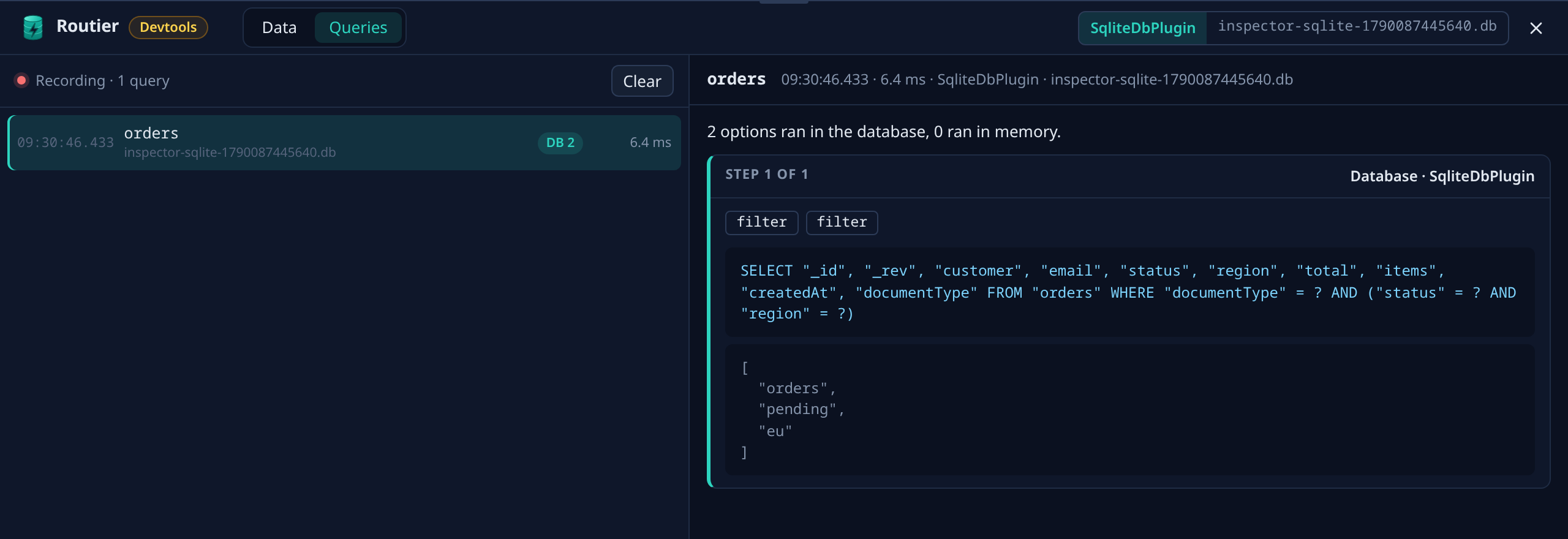
The Queries tab records every query your app runs while the tab is open, across every mounted store, newest first, keeping the last 200. Each entry shows the collection and its store, whether it is a live query, how many options ran in the database and how many in memory, and how long it took. Select one to see the plan .explain() would give you: each execution step, the options in it, the statements the plugin sent with their parameters, and why anything ran in memory.
Recording only runs while the tab is open. Devtools' own queries are never recorded.
Plugin names come from each plugin's class name. If your production build minifies class names, turn on your bundler's keep-names option (esbuild: { keepNames: true } in Vite) so the drawer shows SqliteDbPlugin rather than a shortened name.
A failed query shows as an error in the drawer and is logged through the Routier logger. Devtools never throw into your app.
Production
In a production build, mountRoutierDevtools does nothing, and your bundler drops the drawer from the bundle. You do not need to add a condition around the call. This relies on your bundler replacing process.env.NODE_ENV, which Vite, webpack, Rspack, esbuild, and Next.js all do.
To debug a live site, import from the production entry, which always mounts:
import { mountRoutierDevtools } from "@routier/devtools/production";

mountRoutierDevtools(store);
Every row becomes visible
The production entry shows every row of every collection to anyone who can open your page. Do not ship it to users. Put it behind a flag only your team can turn on, and remove it when you are done.
Building your own tooling: inspect()
The drawer reads your store only through dataStore.inspect(), a public, read-only API you can use too:
import type { StoreInspection } from "@routier/datastore";

const inspection: StoreInspection = store.inspect();

for (const collection of inspection.collections) {
    console.log(collection.name, collection.kind, await collection.count());
}

const [first] = inspection.collections;
const stop = first.watchPage({ skip: 0, take: 50 }, page => {
    if (page.status === "success") console.table(page.rows);
});

stop();| Member | What it gives you |
|---|---|
plugin | The store's plugin, as { name, databaseName }. name is the plugin's class name. |
collections | Every collection and view, as { name, schemaId, kind } plus the methods below. kind is "collection" or "view". |
disposed | An AbortSignal that aborts when the store is disposed. |
count() | The collection's row count. |
watchCount(onCount) | The count now and after every change. Returns a function that stops watching. |
watchPage({ skip, take }, onRows) | One page of rows now and after every change. Returns a function that stops watching. |
keyOf(row) | A string that identifies a row across deliveries. |
watchQueries(onQuery) | Every query the app runs from now on, with its duration, outcome, and explanation. Returns a function that stops watching. Costs nothing while nobody watches. |
Results arrive as { status: "success", ... } or { status: "error", error }. Rows are frozen copies, so nothing you do with them can change the store. Nothing on the inspection object can.
Every query inspect() makes carries source: "Inspection" on the event your plugins receive. The value is exported as INSPECTION_SOURCE from @routier/datastore, so a plugin such as a timing wrapper can leave devtools traffic out.
Example
A runnable example lives in examples/devtools. Build the repository with npm run build, then start it with node_modules/.bin/vite examples/devtools.
import { s } from "@routier/core/schema";
import { DataStore } from "@routier/datastore";
import { MemoryPlugin } from "@routier/memory-plugin";

const taskSchema = s.define("tasks", {
    id: s.string().key().identity(),
    title: s.string(),
    done: s.boolean(),
    createdAt: s.date(),
    tags: s.array(s.string()),
}).compile();

const openTaskSchema = s.define("openTasks", {
    id: s.string().key(),
    title: s.string(),
}).compile();

export class TaskStore extends DataStore {
    tasks = this.collection(taskSchema).proxy().create();

    openTasks = this.view(openTaskSchema)
        .derive(done =>
            this.tasks.subscribe().where(task => task.done === false).toArray(result => {
                if (result.ok === "success") {
                    done(result.data.map(task => ({ id: `open:${task.id}`, title: task.title })));
                }
            })
        )
        .create();

    constructor() {
        super(new MemoryPlugin("devtools-example"));
    }
}import { mountRoutierDevtools } from "@routier/devtools";
import { TaskStore } from "./store";
const store = new TaskStore();
mountRoutierDevtools(store, { name: "Tasks" });
let created = 0;
async function addTask() {
created++;
await store.tasks.addAsync({
title: `Task ${created}`,
done: false,
createdAt: new Date(),
tags: created % 2 === 0 ? ["even"] : ["odd"],
});
await store.saveChangesAsync();
}
async function completeOldestOpenTask() {
const task = await store.tasks.firstOrUndefinedAsync(candidate => candidate.done === false);
if (task === undefined) return;
task.done = true;
await store.saveChangesAsync();
}
async function addMany() {
for (let index = 0; index < 120; index++) await addTask();
}
const actions: Record<string, () => Promise<void>> = {
add: addTask,
complete: completeOldestOpenTask,
many: addMany,
};
document.addEventListener("click", event => {
const button = event.target instanceof HTMLElement ? event.target.closest("button[data-action]") : null;
const action = button instanceof HTMLButtonElement ? actions[button.dataset.action ?? ""] : undefined;
if (action !== undefined) void action();
});